Process Material Defect Alert
Author: James Syu
"Repair" is an integral part of the manufacturing process in EMS factories. In the early days, due to limitations in Manufacturing Information System (MIS) development and communication tools, defect data related to process and component issues had to be manually collected and consolidated after repair activities. Abnormalities were then reported through the MIS / e-mail notifications. However, this manual reporting approach often resulted in missed notifications and additional labor-intensive work, preventing the establishment of a comprehensive and effective process/component defect response mechanism.
In recent years, with the rapid advancement of MIS application development and communication technologies, defect data can now be automatically collected and analyzed by MIS systems. The results are then instantly pushed to mobile applications, enabling personnel to receive process and component defect information in real time through their smartphones. This allows immediate abnormality analysis and corrective actions to be carried out. The transition from manual data collection and e-mail notifications to automated data analysis and notifications has significantly improved the timeliness and effectiveness of the defect response mechanism.
In addition to its application in process and component defect management, P-DUKE has established standardized push-notification procedures. Besides real-time alerts, the system also provides scheduled reminder notifications, helping responsible personnel respond more quickly to abnormalities and accelerate root cause analysis and corrective actions. These advantages contribute to enhanced process control and continuous improvement of manufacturing quality.
Process & Component Defect Push Notification
- Configure the trigger conditions for process and component defect push notifications, and perform defect analysis, corrective actions, and feedback reporting.
- Process Defect Push Notification (as highlighted in the red box in Figure 1).
- Component Defect Push Notification (as highlighted in the red box in Figure 2).
Figure 1
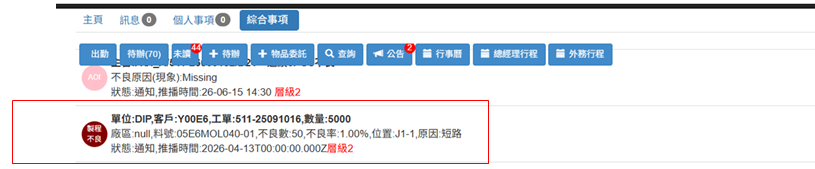
Figure 2